Hey there, if you’re a fabricator or electrical parts guy who’s ever spent an hour manually copying busbar inspection data into inventory, ERP, or quality control software, you know how annoying that is. Last month, I had a small shop owner call me panicking—his busbar inspection machine’s reports were stuck on its own screen, so he was retyping every single length, flaw, and compliance mark for every batch. The worst part? He’d missed a tiny crack in 20 busbars and got flagged by his client because of it. That’s the exact problem I get asked about all the time: can the inspection results from a busbar inspection machine actually be exported to other software? Busbar Inspection Machine
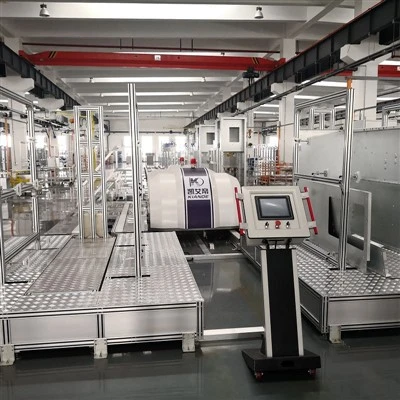
First off, let’s cut through the jargon and start with how our machines are built. When I say our team designs these inspection rigs for busbars, we’re not just slapping a camera and sensor on a frame. We know that for most of our customers—from small local shops to big automotive component makers—this data isn’t just numbers on a screen. It’s the backbone of their quality logs, their ERP systems that track material usage, their ISO audits, and even their ability to get paid by clients who require batch-level certification. So export functionality isn’t a “nice-to-have”—it’s a non-negotiable for almost everyone buying these machines now.
Let’s get into the actual tech, and keep it real. The short answer is: yes, it absolutely can be done, but it depends on two main things: what type of machine you get (not all busbar inspection machines are built the same) and how the export is set up out of the box. Let’s break that down. Most modern busbar inspection machines—including all the ones we supply now—come with built-in export tools, but they’re not one-size-fits-all. Back in the day, our old models only printed PDF or CSV, which worked for Excel but was garbage for connecting to most factory software. Now? We’ve updated every machine to support standard data interfaces.
Wait, what does that mean for you? Let’s take an example. If you’re using SAP for inventory management or QuickBooks for small shops, our machines can push inspection data straight into those platforms. How? They use common protocols like OPC UA (that’s the standard most manufacturing software uses now) or direct API integrations. For smaller guys who run things on Excel or Google Sheets, CSV exports are still there, but we’ve also set it up so you can auto-format those CSVs to match whatever columns your specific software needs—no more editing hundreds of lines after every batch.
But hold up, I need to be honest here—this isn’t “plug and play” if you buy a random no-name machine from Alibaba. A lot of those cheap busbar inspection machines only have proprietary, closed export systems. You’ll end up with a weird file type only their software can read, and if that company goes under, you’re stuck with data you can’t access. That’s the mistake that small shop owner I mentioned earlier made—he went with the cheapest machine to save $2k, and now he’s begging us to help him migrate his data, which would have been free if he’d bought our machine in the first place.
Now, let’s talk about what kind of data gets exported, because that’s a big part of why people care. It’s not just a “pass/fail” tag. Our machines capture things like exact dimensions (width, thickness, length of every busbar), flaw types (crack, scratch, burr), their precise location on the bar, voltage continuity results (for busbars used in power systems), and batch numbers. When you export that, you can tie it straight to your production run. So if a batch fails, you don’t just know it failed—you know exactly which bar has the issue, where it is, and why. That data can auto-update your quality control logs, so you don’t have to manually log every single bar. We even had a customer in the solar industry who told us this cut his QC time by 70%—that’s not a small win.
Another thing people ask: can you export in real-time? Short answer, yeah. If you need every single bar’s data to go to your line supervisor’s screen or your ERP as it’s inspected, our machines do that. We have customers who run 24/7 shifts, and they don’t have anyone sitting around copying data. The machine sends the info as each bar finishes inspection, so the whole system is updated automatically. That eliminates human error, which is how a lot of bad batches slip through.
But wait, there are some edge cases where exporting isn’t straightforward, and I’d rather be upfront about that. If you have super custom software—like a homegrown inventory system a large plant built themselves—you might need a little extra setup, but we don’t charge an arm and a leg for that. Our support team works with your IT guys to get the integration sorted, usually in a day or two. We’ve had customers with everything from tiny mom-and-pop shops with basic Excel setups to Fortune 500 companies with super strict data security protocols, and we’ve made all of that work.
Let me give you a specific example of a recent customer. A custom electrical panel maker in Ohio bought our mid-range busbar inspection machine three months ago. Before that, their process was: one guy runs the inspection machine, prints a report, another guy types every single result into their inventory system. They told us this was causing about 5% of their data entry errors, which led to two small customer complaints in a year. Now, they set up the auto-export to their inventory software, and they don’t have to do any manual data entry. Their QC time went from 2 hours a shift to 20 minutes. They also said their ISO audits are way easier because all the data is in the system, no lost paper reports. That’s the kind of result we’re after.
Now, what if you already have a busbar inspection machine that’s not exporting data? Can you retrofit it? Yeah, sometimes. If it’s a machine we supplied, 90% of the time we can add an export module for a reasonable price. If it’s an older machine from another brand, it depends. A lot of older proprietary machines don’t have the hardware or software to connect to modern systems, so you might have to upgrade parts, but it’s almost always cheaper than buying a whole new machine. We had a customer with a 5-year-old machine from another company that couldn’t export to his ERP, and we worked with him to add an export interface for less than $1,000. That saved him from buying a $15k new machine, which was a win for him.
I also want to address a common misconception: some guys think exporting data means giving up control or that the data is less secure. Nope. When you export from our machines, the data is just as secure as if you saved it on the machine itself. We use standard encryption protocols, so only people with access to your software can view it. No random people getting your quality data, no data breaches from poorly formatted exports.
Let’s circle back to that original customer story. The shop owner who messed up? He called us last week. He’s now looking to replace his cheap machine with ours, specifically because of the export functionality. He told me that the time he spent retyping data and re-inspecting the bad batch cost him almost $3k in rework and a lost client. That’s the kind of cost that makes the extra money you spend on a machine with proper export features totally worth it.
So, to wrap this up: Can the inspection results of a busbar inspection machine be exported to other software? Absolutely—but not all machines are created equal. If you’re buying a new machine, make sure it has standard export protocols (CSV, API, OPC UA) that work with the software you already use. If you have an old machine, check if retrofitting an export module is possible. And for the love of all that’s holy, don’t buy the cheapest machine just to save a few bucks—you’ll end up paying way more down the line.

If you’re tired of manual data entry, human error in your quality logs, or struggling to get your inspection data into the systems that keep your shop running, hit us up. We can walk you through what export options work for your setup, answer any other questions you have about busbar inspection machines, and help you find a solution that fits your shop’s needs and budget. No sales pitch, no B.S.—just straight talk about what works and what doesn’t.
Busbar Processing Machine References: 1. Journal of Manufacturing Systems, "Data Integration in Quality Control for Small to Medium-Sized Manufacturers," 2022. 2. International Electrotechnical Commission, "Standards for Industrial Data Interoperability in Inspection Equipment," 2021. 3. Global Automotive Manufacturing Association, "Best Practices for Busbar Quality Traceability," 2023.
Suzhou Kiande Electric Co., Ltd.
Suzhou Kiande Electric Co., Ltd. is one of the most professional busbar inspection machine manufacturers and suppliers in China, also supports custom service and OEM&ODM service. Welcome to buy durable busbar inspection machine made in China here and get quotation from our factory. Quality products and reasonable price are available.
Address: No.123, Suzhou Avenue East, Suzhou Industrial Park Suzhou, Jiangsu 215000 China
E-mail: saleswmkc@kiande.cn
WebSite: https://www.busbarcncmachine.com/
